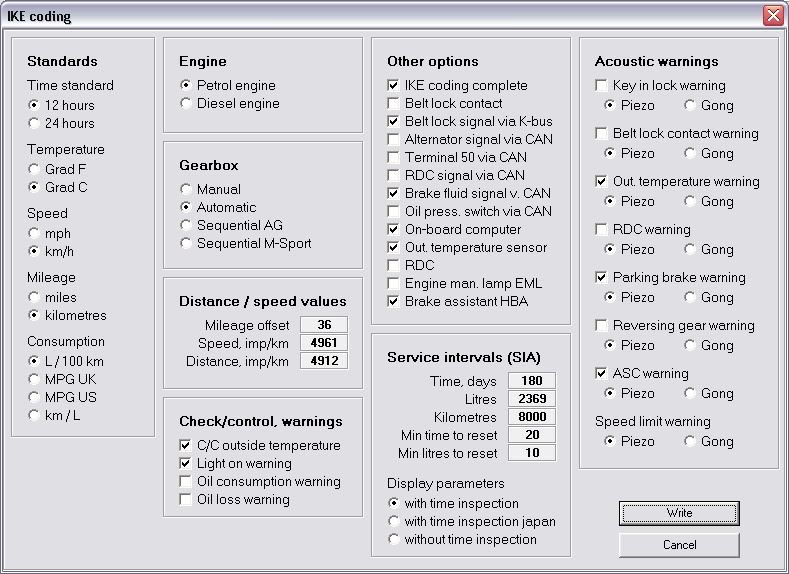
Extract from BMW WDS.
Service Interval Display reset
On vehicles with a diagnosis socket in the engine compartment, the Service Interval Display (SIA) is reset using the familiar SIA reset. In the case of vehicles where the diagnosis socket in the engine compartment has been eliminated,the Service Interval Display is reset using the left-hand button in the instrument cluster (reset button for trip distance recorder) according to a defined sequence.
Service Interval Display
The Service Interval Display (SIA) serves the driver and workshop as a display for the due date of a distance-based inspection (oil service or inspection) or a time-based inspection. The service intervals of the vehicle are calculated not only based on the kilometres covered but they are also related to the fuel consumption.
Remaining distance and remaining time to next inspection:
As of ignition key position 1 or after starting the engine, the instrument cluster shows the remaining distance to the next inspection or next oil service for a few seconds. By pressing the right-hand button (clock button) in the instrument cluster while the remaining distance to the next due inspection or oil service is indicated the display alternates between the remaining distance display and the time-based inspection display every time the button is pressed. While the Service Interval Display is shown, the distance and trip distance recorders as well as the on-board computer functions are hidden. If the remaining distance is preceded by a minus sign this indicates that the remaining distance has already been exceeded by the indicated amount.
The data of the Service Interval Display (SIA) is also stored in the light switch centre (LSZ). If the instrument cluster is replaced, then coded and assigned by means of the vehicle identification number, the SIA data is transferred to the instrument cluster.
Resetting the Service Interval Display
Vehicles with a diagnosis socket in the engine compartment:
In the case of vehicles with a diagnosis socket in the engine compartment, the Service Interval Display (SIA) is reset by pulses of a defined length to the service interval reset input. Time-based and distance-based inspection can be carried out individually and independent of each other (SIA reset) provided the consumption value defined in the coding data or the minimum time is reached. If the reset is performed using the SIA reset, as before 1/5 of the coded consumption or in the case of a time-based inspection 20 days must have been reached.
Vehicles without a diagnosis socket in the engine compartment:
In the case of vehicles without a diagnosis socket in the engine compartment, the Service Interval Display (SIA) is reset using the left-hand button (reset button for the trip distance recorder) in the instrument cluster. Each reset can be carried out individually, whereby the minimum consumption quantity specified in the coding data or the minimum time must have been reached. On the E46, E85 and E83, this minimum consumption quantity has been coded to 10 litres. This makes it possible to correct an incorrect sequence (oil service, inspection) caused by an incorrect Reset without having to wait until 1/5 of the consumption has been accumulated, which would be the case if the reset were carried out using the diagnosis system. As is the case when using the SIA reset, the time-based inspection can only be reset after the 20-day time limit has been reached. Each due distance-based inspection (oil service or inspection) and the time-based inspection can be rest, whereby the action ”Reset distance-based inspection” always has to be run first.
Resetting the Service Interval Display (distance-based inspection)
Turn ignition lock to position 0
Press the left-hand instrument button (reset button for the trip distance recorder), keep it pressed and turn the ignition lock into position 1 (terminal R)
The input mask for the test functions appears
Press and hold the button; after 5 seconds, the service status is displayed
SIA OIL SERVICE or INSPECTION and the remaining distance are shown
The remaining distance is displayed with ”Reset” if the coded minimum consumption limit has been reached and can be reset.
If the remaining distance is displayed without ”Reset”, the coded minimum consumption limit has not been reached and no ”Reset” is possible.
To reset
Press and hold down the button to enter the reset mode after another 5 seconds if the coded minimum limit has been reached.
If the minimum limit has been reached, ”Reset” flashes in the display for 5 seconds.
The distance-based inspection can now be reset by releasing, pressing again and releasing the button while the display is flashing.
After the reset, the new remaining distance is displayed for 5 seconds.
If resetting is not required, the old remaining distance can be retained by releasing the button and waiting for the flashing sequence to elapse.
The old remaining distance is displayed for 5 seconds.
Resetting the Service Interval Display (time-based inspection)
The time-based inspection can be reset after the distance-based inspection.
If the time-based inspection is not coded, End SIA is displayed with the old remaining distance (if this has not been reset) or with the new remaining distance for the distance-based inspection (if this has been reset).
The time-based inspection status is shown if time-based inspection is encoded.
The due time-based inspection is shown with or without ”reset”.
The due time-based inspection is shown with ”reset” if the coded minimum limit has been reached.
The due time-based inspection is shown without ”reset” if the coded minimum limit has not been reached.
To reset
If the due time-based inspection is displayed with ”reset”, press and hold down the button for longer than 5 seconds.
After 5 seconds, the display ”reset” flashes for 5 seconds.
If resetting is required, the time-based service can now be reset by releasing, pressing again and releasing the button while ”reset” is flashing.
The new time-based inspection status is shown for 5 seconds followed by End SIA together with the new time-based inspection status.
If resetting is not required, the old time-based service status can be retained by releasing the button and waiting for the flashing sequence to elapse.
The old time-based inspection status is shown for 5 seconds followed by End SIA together with the old time-based inspection status.