Group Buy: Multifunction headunit for DVD, TV, GPS, Bluetooth, iPod

  • Click here to become an Official Member of BMW Club Malaysia Download Form
Realred78;589762 said:
Guys, anyone finds that the volume is louder than you left it after turning off your car and restarting it up later? Mine tends to do that whether I turn off the unit or just leave it on when turning off my car engine. Is that normal?

The other thing is every time I exit the GPS program and then return to it later, I have to change the comm port from "1" to "2" before using the GPS.

realred, what gps navi are you using? you need to edit something in text format. tell me and I will show you where to edit it.

For iGo, just edit sys.txt at the root directory using notepad editor.
[interface]
show_exit=1

[rawdisplay]
screen_x=800
screen_y=480

[debug]
skip_eula=1

[timezone]
sync_os_timezone=0
reset_os_timezone=0

[gps]
port=2
buad=57600


[debug]
skip_eula=1
enable_roadshadow=1

[map]
auto_nightmode=1
3d_scale_carmodel=1
3dcarsizemin=30
3dcarsizemax=40
3dcarsizemul=20
 
Realred78;589762 said:
Guys, anyone finds that the volume is louder than you left it after turning off your car and restarting it up later? Mine tends to do that whether I turn off the unit or just leave it on when turning off my car engine. Is that normal?

The other thing is every time I exit the GPS program and then return to it later, I have to change the comm port from "1" to "2" before using the GPS.

Like Jarance said, edit the Com port and baud rate in the 'sys' file to match the auto search one. The 'sys' is a text file inside the microSD.

There have a default sound setting in the 'setting'. U can set the sound to the level u comfortable every time when u turn on the HU .
 
bmw7833;584149 said:
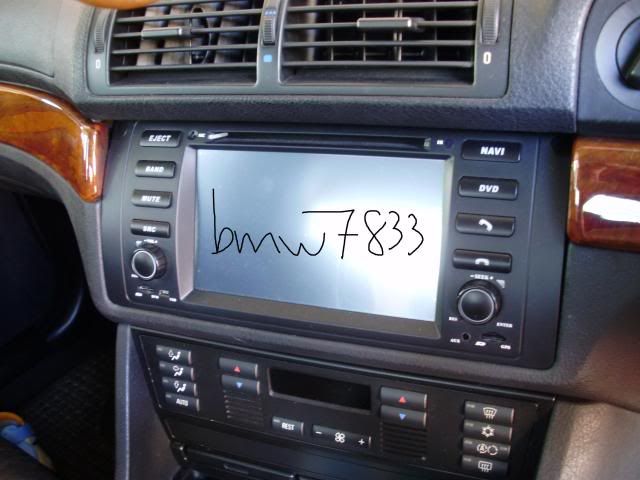
An example for E39:

Bro, some question..when we use this unit for E39, will we be able to view the check computer which originaly we can view from the original unit. For example the trip/km/clock etc.
Thanks
 
yoke;589984 said:
Bro, some question..when we use this unit for E39, will we be able to view the check computer which originaly we can view from the original unit. For example the trip/km/clock etc.
Thanks

Can not. Most (May be all) aftermarket double din can not read the data.

What u can do is connect the MD in your glove box.
 
jarance;589770 said:
realred, what gps navi are you using? you need to edit something in text format. tell me and I will show you where to edit it.

For iGo, just edit sys.txt at the root directory using notepad editor.
[interface]
show_exit=1

[rawdisplay]
screen_x=800
screen_y=480

[debug]
skip_eula=1

[timezone]
sync_os_timezone=0
reset_os_timezone=0

[gps]
port=2
buad=57600


[debug]
skip_eula=1
enable_roadshadow=1

[map]
auto_nightmode=1
3d_scale_carmodel=1
3dcarsizemin=30
3dcarsizemax=40
3dcarsizemul=20

Can I plug in my laptop directly to the unit via the USB port to do this? I do not have a micro SD card reader.
 
Realred78;590037 said:
Can I plug in my laptop directly to the unit via the USB port to do this? I do not have a micro SD card reader.

Not really for this DD player. Beside you still need ActiveSync to get the communication.

The micro SD card can be easily purchase from any phone shop. Just buy a micro SD card and the adpator is FREE.

or come to MMZ this Sunday around 4:30 pm. I will edit for you. Just bring a laptop.
 
regarding the glare for the E46 DD Player, I have found that if tilt the player a few degree down, it will make the glare to go top the screen. To me it is better than when it is at the top of the screen when you are using the navigation menu.

This can be done by installing the aircon louver duct first and then the player.

I have a bit of a problem of removing the aircon duct until daiichi show me the easy way.
 
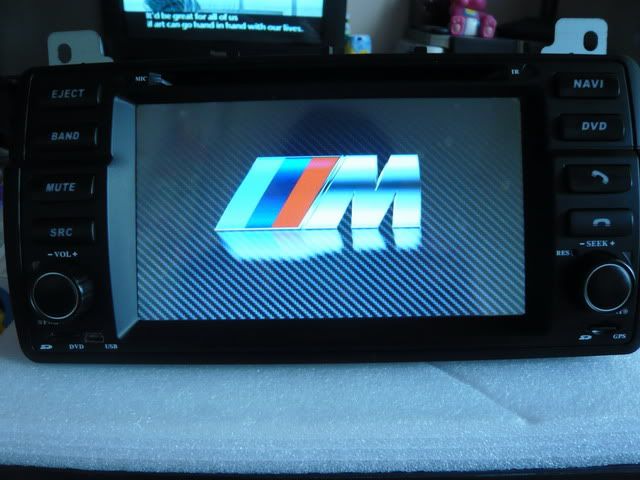
Jarance sifu!!! Thanks so much for the updated software. Managed to change my boot up logo to the ///M logo instead of that half baked Hualingan BMW logo. I kind of forgot the steps for the iDrive Papago navigation. Which .exe file should I chose from settings in the Papago folder?
 
RR78,

Just do the following:-
1. Go to "Setting" Menu.
2. Click once and "GPS Path" icon.
3. Click "Storage card" folder
4. Select "Papago" folder and Select "OK"
5. Navigate in the Papago folder and select "X5SE_800x480_C2_B9600.exe" and press "OK"
6. The GPS should update to the above ".exe"
7. Press the "HOME" icon (look like a house) and press "GPS" icon. Your Navi program will be invoke.

p/s there is a slight delay in the papago navi program. Reason is that it is setup as C2 and 9600 baud rate. Hence the updating is
a bit slow. whereas the iGo is set to Com2 and 57600 baud rate.

Trying to set papago to baudrate of 57600. WIP.

p/s. do the above if you want the i-Drive skin by selecting "WolfNCU" folder and "WolfNCU.exe"
 
jarance;591107 said:
RR78,

Just do the following:-
1. Go to "Setting" Menu.
2. Click once and "GPS Path" icon.
3. Click "Storage card" folder
4. Select "Papago" folder and Select "OK"
5. Navigate in the Papago folder and select "X5SE_800x480_C2_B9600.exe" and press "OK"
6. The GPS should update to the above ".exe"
7. Press the "HOME" icon (look like a house) and press "GPS" icon. Your Navi program will be invoke.

p/s there is a slight delay in the papago navi program. Reason is that it is setup as C2 and 9600 baud rate. Hence the updating is
a bit slow. whereas the iGo is set to Com2 and 57600 baud rate.

Trying to set papago to baudrate of 57600. WIP.

p/s. do the above if you want the i-Drive skin by selecting "WolfNCU" folder and "WolfNCU.exe"

Thanks so much sifu Jarance. Will do as instructed. I love my new boot up logo.
 
Jarance,

Yes Papago is rather slow. Sometimes lost the connection. Today that Papa refuse Go when i ask him to GO and find Westin Hotel. Give me a runaround. Pulled over and switch to iGo. That fellow really Go la... Very smart one. Now back to love iGo

jarance;591107 said:
RR78,

Just do the following:-
1. Go to "Setting" Menu.
2. Click once and "GPS Path" icon.
3. Click "Storage card" folder
4. Select "Papago" folder and Select "OK"
5. Navigate in the Papago folder and select "X5SE_800x480_C2_B9600.exe" and press "OK"
6. The GPS should update to the above ".exe"
7. Press the "HOME" icon (look like a house) and press "GPS" icon. Your Navi program will be invoke.

p/s there is a slight delay in the papago navi program. Reason is that it is setup as C2 and 9600 baud rate. Hence the updating is
a bit slow. whereas the iGo is set to Com2 and 57600 baud rate.

Trying to set papago to baudrate of 57600. WIP.

p/s. do the above if you want the i-Drive skin by selecting "WolfNCU" folder and "WolfNCU.exe"
 
hello bro, any feedback after install this units?any positif feedback or negative?it is fit into e46?and the outlook?
 
bmw7833;581155 said:
Anyone interested?
I have few extra sets.
PM me for special price, thanks.


This is how it looks in E39:

1-6.jpg


This is how it look for E46 (Credited to Jarance):

CopyofP1050740.jpg


Pls mention your car model, year of made and the original headunit (cassette/CD, 4:3/16:9 wide screen).

1. bmw7833: E46,
+ reverse camera [Collected]
2. johnj: E46, + reverse camera [Collected]
3. nazrie: E46, + reverse camera [Deposit paid]
4. Daiichi: E46,
+ reverse camera [Collected]
5. zidee: E39, + reverse camera
[Collected]
6. Realred78: E39, + reverse camera [Collected]
7. XXX: E39,
+ reverse camera [Collected]
8. kadir_rashid: E38, + reverse camera[Collected]
9. harbhajan: E39, + reverse camera [Collected]

Hi,

Wonder what is the total cost for 2003 E39 520i with cassette + 6 CD changer convert to the multifunction head unit? Include installation as well as i dunno how to DIY. Thanks
 
Pls let me know for those want me to install for their e39, i am free to meet tomolo and Sunday in KL. Cheers!
 
Top Bottom